
Point of sale, warehouse and e-invoices in one program.
Kigo.Cloud runs your sales, warehouse, web shop and service in one place. It works in the browser, on a computer, tablet and phone.
Signing up is free, no card needed.
- Fiscalization and Fiscalization 2.0
- Issued and received e-invoices
- Nothing to install
Invoice, quote and e-invoice from the same place.
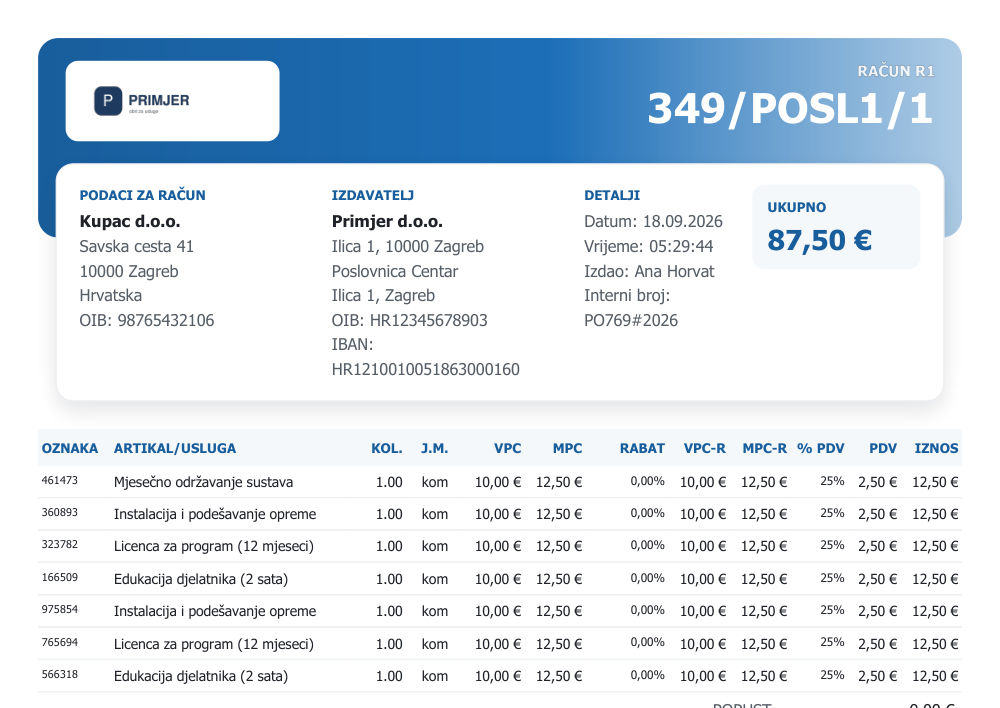
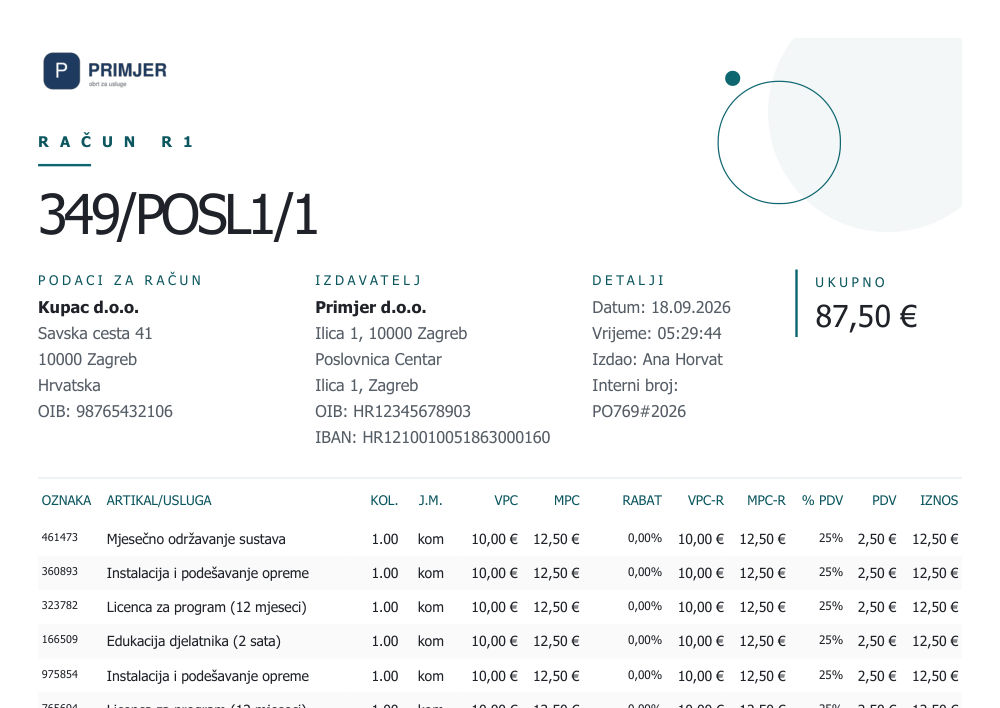
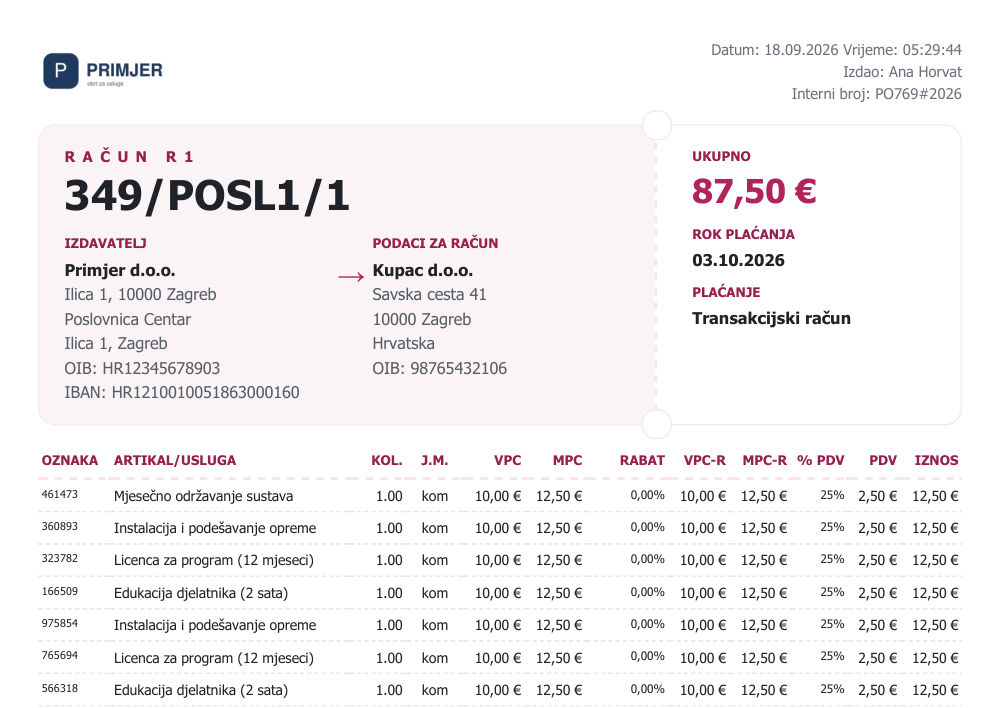
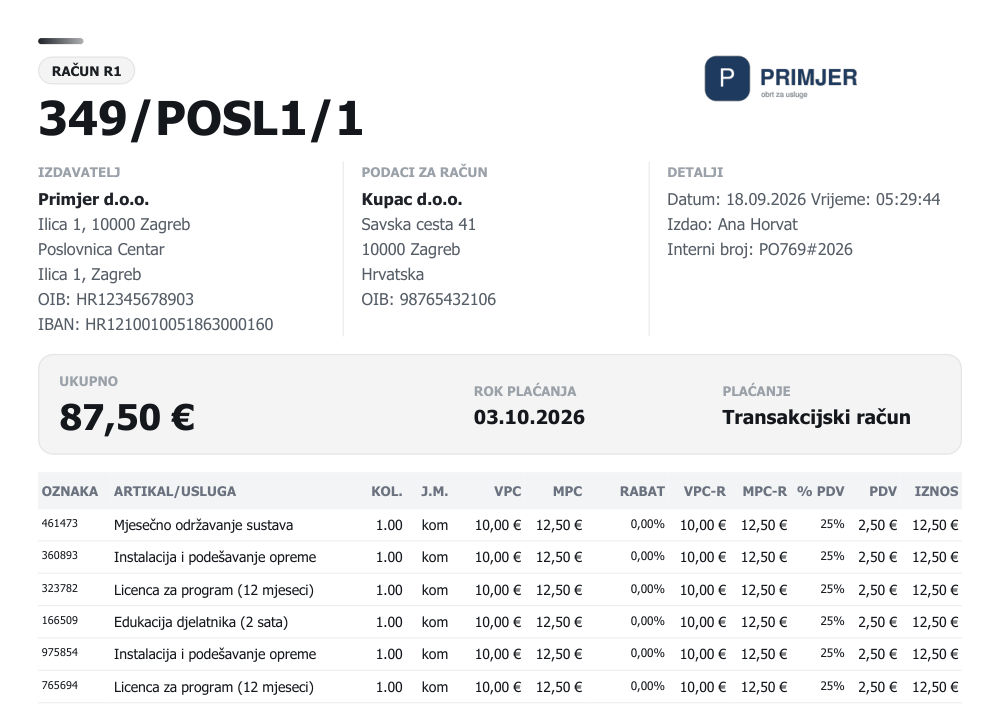
You issue invoices, quotes and work orders in one program, with fiscalization and e-invoices. The document looks like your company: choose one of 14 A4 invoice designs and adjust it to your colour and font.
- Invoices, quotes and work orders
- Fiscalization and Fiscalization 2.0
- Issued and received e-invoices
- Recurring invoices and quotes
- 14 A4 invoice designs, with your colour and font
A warehouse down to the shelf.
Goods receipts, issues and transfers keep stock per warehouse, and a supplier's incoming e-invoice becomes a goods receipt. With warehouse logistics every item has its place on the shelf.
- Goods receipt, issue, transfer, write-off and return
- Incoming e-invoices imported into goods receipts
- Stocktaking and price changes
- Warehouse map with locations and movement history
- Minimum and maximum stock with notifications
Web shop and store on the same stock.
Items, stock and prices stay in sync with your WooCommerce and Shopify shop, in both directions. A web order becomes a fiscalized invoice without retyping.
- Web orders received and fiscalized
- Two-way sync of items, stock and prices
- Stripe: fiscalization of payments
- API for your own integrations
Advance payments under control, from quote to final invoice.
When a job is paid in several instalments, Kigo.Cloud keeps it as one whole: the quote, all advance invoices and the final invoice. At any moment you see how much has been paid, how much is left and what is ready to close, even when the job runs across several years.
- Overview of all advances per job, with status and remaining amount
- Final invoice from the quote, with all advances deducted automatically
- The job continues into the new year without being split up
- Report of open advances, also as of any past date
- Correct e-invoices for advances and their cancellations
| Job | Customer | Remaining | Status |
|---|---|---|---|
| PO-133 | Kuhinje Novak | 3.600,00 € | Ready for final invoice |
| PO-128 | Studio Lana | 5.250,00 € | Open |
| PO-96#2025 | Mali dućan d.o.o. | 1.900,00 € | Open |
| PO-121 | Obrt Horvat | 0,00 € | Closed |
Ask the program, get an answer from your own data.
The assistant reads your invoices, items, customers and stock and answers in a few seconds, in plain language. When you get stuck, it also knows how the program works.
- Who owes me money, and since when?
- What was my revenue yesterday?
- Where is this item in my warehouse?
- How do I cancel an invoice?
| Mali dućan d.o.o. | 1.240,00 € · 12 days |
| Obrt Horvat | 980,00 € · 5 days |
| Studio Lana | 640,00 € · 2 days |
The figures you usually build in Excel, ready every morning.
A dashboard with revenue, trend and margin, and below it answers to the questions you would otherwise only guess at.
- Open items and cash inflow forecast
- Stock health: what sits still and what needs ordering
- Customer segmentation and customer value over time
- Sales by region and staff performance
From vehicle intake to invoice, in one work order.
You take in the vehicle with photos and documents, run the work through the planner, and the customer is notified when it is done. For hail damage there is PDR: dents per vehicle panel and a price list that calculates the amount itself.
- Vehicle intake, planner and service records
- Service bookings with scheduling and customer notifications
- Service and warranty work orders, service goods issues
- Photos, contracts and inspections kept with the vehicle
- Damage estimate before the service booking
- PDR: hail map, vehicle panels and price lists by dent size
- Integration with a 3D scanner
- Multiple service locations and technician statistics
| Panel | Dents | Amount | Status |
|---|---|---|---|
| Bonnet | 14, up to 20 mm | 420,00 € | Repaired |
| Roof | 22, up to 30 mm | 780,00 € | Repaired |
| Front left door | 6, up to 20 mm | 180,00 € | Done today |
| Boot lid | 9, up to 30 mm | 310,00 € | In progress |
For work that is more than a till.
Customers book an appointment online themselves and you see everything in the calendar. Vehicle service, assembly and complaints run in the same program, with the same customers and items.
- Online appointment booking and calendar
- Assembly: orders, assembly planner and queue
- Workshop screen and assembly requests between branches
- Complaints with deadlines and a public link for the customer
- Complaint types and handling workflow
A program that grows every week.
New features arrive regularly and are available right away, with nothing to install.
See what's newEverything Kigo.Cloud has
From the point of sale to the warehouse, service and web shop, all in one place.
26 areas of work, 214 features in one program
Sales and payments
Sales and point of sale
From an offer to a paid invoice, at the till or in the office.
- Invoices, offers and work orders
- Point of sale screen for fast invoicing
- Recurring invoices and offers, fiscalized automatically
- Customer orders
- Invoice from an offer, work order or order
- Splitting an offer into several supplier orders
- Discount per line and for all lines in one click
- Bulk sending and payment marking of invoices
- List of issued invoices with export
- Cards and other payment methods
- HUB-3A payment slip on invoices and offers
- Printing to a receipt printer and A4, cash drawer opening
Fiscalization and e-invoices
Fiscalization 2.0 and e-invoices in every plan, sent and received.
- Invoice fiscalization
- Fiscalization 2.0
- Sending and receiving e-invoices
- Received e-invoice straight into a goods receipt
- Check by OIB whether the customer can receive e-invoices
- E-reporting on payments and on undeliverable e-invoices
- E-invoices for advances and cancellations
- Discount, delivery GLN and document links in the e-invoice
- Download of the e-invoice XML
- Upload of the fiscalization certificate
- Overview of unfiscalized invoices and resending
VAT and regulations
What the regulations require on an invoice, built into document creation.
- Customers as B2B, B2C or B2G
- Reverse charge for EU customers, with VIES check
- Domestic reverse charge
- Cash accounting for VAT
- Legal notes per invoice line
- KPD classification of items and groups
- Creation of the internal act
- Book of issued invoices (IRA)
- KPR and PO-SD forms for sole traders
Invoice design
A document that looks like your company, without a designer.
- 14 A4 invoice and offer designs
- Colour, text font and heading font
- Footer in columns on every page
- Live preview with your own data
- Invoices in Croatian, English and German
- Templates for additional documents
- Notes on documents
Advance payments
A job paid in several instalments is handled as one whole.
- Advance invoices
- Several advances per offer
- Advances per job, with a timeline
- Final invoice with advances deducted
- Turning an invoice into an advance invoice
- Jobs that span several years
- Open advances report, also for a past date
Cash register
Cash in the till recorded from the first to the last invoice of the day.
- Cash receipts and payouts
- Daily cash report
- Daily deposit
- Cashier report
- Opening cash balance
Customers and receivables
Who owes, how much and since when, for every customer.
- Partners: customers and suppliers
- Company data from the court register
- Customer branches and contact persons
- Partner card with all documents
- Customer ledger: open, overdue, due in 7 days
- Recording of payments and partial payments
- Customer card with postings
Items, warehouse and purchasing
Items and prices
A catalogue that follows how you really sell: piece, kilogram, metre or hour.
- Items, services and groups
- Item import from a CSV file
- Search by name, code, barcode and supplier code
- Manufacturers
- Product declarations and their printing
- Printing of item and service price lists
- Price levelling
- Price and tax change for a whole group
- Lowest selling prices
- Margin items and margin services
- Quantities with three or more decimals, decimals per unit of measure
- Package size
- Deposit refund fee
Warehouse and purchasing
Stock per warehouse, from the supplier order to stocktaking.
- Several warehouses: regular, consignment, warranty
- Supplier orders
- Goods receipt and purchase calculation
- Margin goods receipt and calculation
- Receipt preparation and items on the way
- Goods in transit, from suppliers and own warehouses
- Goods issue, write-off and return to supplier
- Stock transfer between warehouses
- Stock overview
- Item reservations
- Stocktaking list, surplus and shortage
- Assembly and disassembly lists
Consignment
Other people's goods with you and your goods with others, with settlement of what was sold.
- Consignment receipt, settlement and return
- Consignment issue, return and settlement
- Stock of incoming and outgoing consignment warehouses
- Turnover of incoming consignment
Warehouse logistics
Every item has its place on the shelf and a movement history.
- Locations and bins in the warehouse
- Warehouse map
- Putaway and relocation
- Picking, with the bin it was taken from
- Shelf replenishment
- Bin labels
- Stocktaking by bin
- Movement history
- Min and max stock with notifications
- Demand forecast
- Dead stock, expiry dates and ABC by sales
- Bin occupancy, low stock and misplaced goods
Anchor prices
A legal duty of retailers met from the records you already keep.
- Anchor price on the reference day, for items and services
- Filling in from price history
- Price list for publication: CSV and XML
- Public price list with a fixed address and a QR code
- Daily price list on your own web shop domain
- Anchor price in the web shop
- Excluding items that are not on the price list
Web shop and integrations
WooCommerce and Shopify
The web shop and the store work with the same items, stock and prices.
- A web order becomes a fiscalized invoice
- Two-way sync of items, stock and prices
- Own plugin KigoCloud for WooCommerce
- R1 company invoice at the web shop checkout
- Invoice and e-mail to the customer in English or German
- Automatic cancellation invoice for a cancelled Shopify order
- Additional rules for Shopify orders
Stripe, API and import
For card payments on the web and for your own systems.
- Stripe: fiscalization of payments
- Stripe Invoicing integration
- API with documentation
- Invoices, items, customers and payment status through the API
- Anchor prices in the API
- CSV import of items
Vehicles, service and field work
Vehicle sales
Car dealership: from the vehicle entering stock to the customer invoice.
- Showroom vehicles with a vehicle card
- Vehicle receipt and purchase calculation
- Vehicle sale from offer to invoice
- Margin invoice at the point of sale
- Vehicle sales report
- Min and max stock and vehicle forecast
Vehicle service
From the booking and vehicle reception to the order, goods issue and invoice.
- Vehicle reception and service planner
- Service bookings with customer notifications
- Registration and chassis number from a photo
- Service and warranty orders
- Service goods issues and service invoices
- Photos, contracts and inspections with the vehicle
- Vehicle history
- Customer vehicles: makes, models and body types
- Service types, working hours and holidays
- Several service locations
- Technician statistics and manager report
- Service setup wizard
PDR
Hail dent repair: assessment per panel and a price from the price list.
- Damage assessment before the service booking
- Hail map and vehicle panels
- Price lists by dent size and count
- Price modifiers
- PDR orders
- Connection to the DriveNScan 3D scanner
Online booking
The customer books an appointment, and you see it in the calendar.
- Public page for booking an appointment
- Photos with the booking
- Managing the booking from the e-mail
- Cancelling a confirmed booking with a reason
- Appointment calendar
- Bookings overview and archive
- Conversion tracking
Assembly
Assembly by order, with a planner and a screen in the workshop.
- Assembly orders in a list and on a board
- Assembly planner with a calendar
- Ordering assembly between locations
- Queue with priority when goods arrive
- Workshop screen
- Part list templates
- Reports by fitter, deadline and duration
Complaints
Every complaint has an owner, a deadline and a status the customer can see too.
- Status board
- Complaint types and workflow
- Deadline tracking and reminders
- Customer notification on status change
- Photos with the complaint
- Public link for the customer
CRM
Sales leads, tasks and orders with the same customers as on the invoices.
- Sales leads and sales pipeline
- Tasks
- Contacts and activities
- Order flow
- Sales overview and dashboard
- Lead and activity types
- CRM reports
Reports and AI assistant
Reports
The turnover and books you need every day, without exporting to spreadsheets.
- Business overview on the home screen
- Business overview report by period and location
- Turnover by period, day and item
- Turnover by customer and staff
- Turnover book for items and services
- Inventory book
- Summaries by document, business and sales
- Tips by staff and invoice
- Comparison of business years in the archive
Advanced reports
Answers to the questions you usually guess at: margin, collection, stock, customers.
- Dashboard, revenue, trend and margin
- Business health score
- Open items and cash inflow forecast
- VAT overview by day and period
- Payment methods and cash flow
- Stock health, dead stock and stock turnover
- What to reorder and when
- Customer segmentation, retention and lifetime value
- Reports on the map: revenue, customers, suppliers
- Staff performance
- Reports for service, bookings, complaints, assembly and CRM
- Scheduled report delivery by e-mail
AI assistant
You ask in plain language, the answer comes from your data. In every plan.
- Answers from your invoices, items, customers and stock
- Turnover, debtors, best sellers
- Where an item is in the warehouse
- Knows which record you are on, with links to documents
- New records as a proposal, with your confirmation
- Conversation history
- Guidance for working in the program
Company, users and interface
Company and users
Several locations and people in one program, each sees their own part.
- Several business locations in one company
- Employees and user accounts
- Roles and permissions per user
- Event calendar with public holidays
- E-mail settings, templates and sent mail log
- Year closing and archive of past years
- Overview of enabled modules
Interface
The same program on a computer, tablet and phone, with nothing to install.
- Computer, tablet and phone
- Croatian, English and German
- Dark and light theme
- Quick page search (Ctrl K)
- Search in settings
- Home screen shortcuts in your own order
- In-app notifications
- Public knowledge base in three languages
- News and improvements
A plan for the size of your business.
Start with the plan you need today and move to a larger one as your business grows.
Starter
For small sole traders running a POS and issuing invoices
- 1 administrator
- Invoices, quotes, work orders
- F1/F2 fiscalization + Fiscalization 2.0
- Outbound and inbound e-invoices
- Email support
Standard
For shops with warehouse and webshop
- Everything in the Starter plan
- Up to 3 users with predefined roles
- Warehouse & purchasing
- Integrations
- Email support, onboarding (1h)
Business
For service shops, salons and companies with a real team and reports
- Everything in the Standard plan
- Up to 7 users with granular roles
- BI / Advanced reports
- Vehicle service
- Phone support, onboarding (3h)
Premium
For companies with CRM and custom needs
- Everything from the Business package
- Up to 30 users
- Unlimited storage for images and documents
- CRM (sales process)
- Dedicated support, onboarding (6h)
Prices are monthly amounts with annual billing, excluding VAT.
Compare plansFrequently asked questions about Kigo.Cloud
What is Kigo.Cloud?
Kigo.Cloud is cloud business software for companies and sole traders in Croatia. One program handles invoices and fiscalization, e-invoices, warehouse and purchasing, the web shop, reports, vehicle service and CRM. It runs in the browser, with nothing to install.
Is Kigo.Cloud an ERP?
Yes. Kigo.Cloud covers what is usually called an ERP for small and medium companies: sales and point of sale, warehouse and purchasing, customer and supplier orders, advance payments, reports, service, complaints and CRM, all on the same items, customers and documents.
Does Kigo.Cloud support Croatian Fiscalization 2.0 and e-invoices?
Yes, in every plan. Kigo.Cloud fiscalizes invoices, supports Fiscalization 2.0 and sends and receives e-invoices. An incoming supplier e-invoice can be turned into a goods receipt in the warehouse.
Does Kigo.Cloud work on a phone and a tablet?
Yes. Kigo.Cloud runs in the browser on a computer, tablet and phone. There is nothing to install, and new features are available to all users right away.
Can Kigo.Cloud be connected to a web shop?
Yes. Kigo.Cloud connects to WooCommerce and Shopify: a web order becomes a fiscalized invoice, and items, stock and prices are synchronized in both directions. There is also a Stripe integration for fiscalizing payments and an API for your own integrations.
Does Kigo.Cloud have an AI assistant?
Yes, the AI assistant is available in every plan. It answers questions from your own data, for example who owes you money, what the turnover was or where an item is in the warehouse, and it explains how to work in the program.
How much does Kigo.Cloud cost?
Kigo.Cloud has four plans: Starter, Standard, Business and Premium. Prices start at 20 € per month + VAT with annual billing. A licence covers one business location. The plan comparison is on the Plans and pricing page.
Can I try Kigo.Cloud before buying?
Yes. Registration is free and needs no card, and a demo account with sample data is available on the sign-in page.
Which languages does Kigo.Cloud support?
The program interface is available in Croatian, English and German.
Start working in Kigo.Cloud
Signing up is free, no card needed. For questions, write to us at [email protected].
All screens on this page are examples with made-up data.